I use Overleaf to write my resume in LaTeX. Every time I made an edit, I had to manually compile it, download the PDF, and push it to my GitHub repo so my portfolio website could link to it. After doing this one too many times, I decided to automate the whole thing.
Here's the full story - the scraper, the GitHub Actions workflow, the bugs I hit, and how I eventually wired it to my portfolio site.
My portfolio at nakuldev.vercel.app links directly to my resume PDF. For that link to always point to the latest version, I'd have to:
Boring. Repetitive. Easy to forget. So I automated it.
Overleaf is a React app - you can't just fetch() it and parse the HTML. The download link only appears after the project compiles, which happens client-side. So I needed a real browser.
I went with Playwright for this.
npm install playwright npx playwright install chromium
The download button in Overleaf's DOM looks like this:
<a href="/download/project/69b65297.../output/output.pdf?..." aria-label="Download PDF">
So the selector I needed was:
a[href^="/download/project"]
Here's the core scraping logic:
await page.goto("https://www.overleaf.com/read/YOUR_SHARE_LINK", { waitUntil: "networkidle", timeout: 60_000 }); await page.waitForSelector('a[href^="/download/project"]', { state: "attached", // important - element lives inside a closed dropdown timeout: 90_000, }); const relativeHref = await page.evaluate(() => { const links = Array.from( document.querySelectorAll('a[href^="/download/project"]') ); const pdfLink = links.find((el) => el.href.includes("output.pdf")); return pdfLink ? new URL(pdfLink.href).pathname + new URL(pdfLink.href).search : links[0]?.getAttribute("href") ?? null; }); const fullUrl = `https://www.overleaf.com${relativeHref}`;
Then download it using the browser's session cookies (so Overleaf accepts the request):
const cookies = await context.cookies(); await downloadFile(fullUrl, destPath, cookies);
waitForSelector timing outMy first attempt used the default visible state:
await page.waitForSelector('a[href^="/download/project"]'); // ❌ timed out
The error log showed:
180 × locator resolved to 2 elements. Proceeding with the first one
The element existed but was hidden inside a closed dropdown menu. It was never going to become visible. The fix was switching to state: "attached" - which only requires the element to be in the DOM, not visible on screen.
I wanted two things from each run:
scrapped/resume01.pdf - a numbered archive (auto-deleted after 7 days)Nakul_Dev_M_V_Resume.pdf in the root - always the latest, fixed filename, safe to link to// Numbered archive const pdfName = nextPdfName(); // resume01.pdf, resume02.pdf... await downloadFile(fullUrl, path.join(SCRAPPED_DIR, pdfName), cookies); // Fixed root copy const rootPdfPath = path.join(ROOT_DIR, "Nakul_Dev_M_V_Resume.pdf"); if (fs.existsSync(rootPdfPath)) fs.unlinkSync(rootPdfPath); fs.copyFileSync(path.join(SCRAPPED_DIR, pdfName), rootPdfPath);
Cleanup for files older than 7 days:
function cleanOldScrapped() { const now = Date.now(); const ONE_WEEK_MS = 7 * 24 * 60 * 60 * 1000; fs.readdirSync(SCRAPPED_DIR) .filter((f) => /^resume\d+\.pdf$/i.test(f)) .forEach((f) => { const filePath = path.join(SCRAPPED_DIR, f); if (now - fs.statSync(filePath).mtimeMs > ONE_WEEK_MS) { fs.unlinkSync(filePath); } }); }
The local script worked great. Now I needed to run it automatically in CI.
name: Overleaf PDF Scraper on: schedule: - cron: "0 6 * * *" # every day at 06:00 UTC workflow_dispatch: # manual trigger via Actions tab repository_dispatch: types: [visitor-trigger] # triggered via API (more on this below) permissions: contents: write jobs: scrape-and-push: runs-on: ubuntu-latest timeout-minutes: 10 steps: - uses: actions/checkout@v4.2.2 with: fetch-depth: 0 - uses: actions/setup-node@v4.4.0 with: node-version: "20" cache: "npm" - run: npm ci - run: npx playwright install --with-deps chromium - run: node scraper.js - name: Commit and push run: | git config user.name "github-actions[bot]" git config user.email "github-actions[bot]@users.noreply.github.com" git add Nakul_Dev_M_V_Resume.pdf scrapped/ History.json if git diff --cached --quiet; then echo "Nothing new to commit." else git commit -m "feat: update resume [$(date -u '+%Y-%m-%d %H:%M UTC')]" git push fi
By default GitHub Actions can't push to your repo. Go to: Settings → Actions → General → Workflow permissions → Read and write permissions
The daily cron covers most cases, but I also wanted to trigger a fresh scrape whenever someone visits my portfolio - so they always get the absolute latest version.
The challenge: you can't call the GitHub API directly from frontend JavaScript because you'd have to expose your token. The solution: a Next.js API route that acts as a secure middleman.
Visitor loads portfolio → calls /api/trigger (server-side) → API route calls GitHub with the secret token → GitHub Actions fires
The API route at app/api/trigger/route.js:
const COOLDOWN_HOURS = 6; let lastTriggeredAt = null; export async function POST() { const now = Date.now(); const cooldownMs = COOLDOWN_HOURS * 60 * 60 * 1000; // Don't trigger more than once every 6 hours if (lastTriggeredAt && now - lastTriggeredAt < cooldownMs) { return Response.json({ ok: false, reason: "cooldown" }, { status: 429 }); } await fetch("https://api.github.com/repos/nakuldevmv/Resume/dispatches", { method: "POST", headers: { Authorization: `token ${process.env.GITHUB_TOKEN}`, "Content-Type": "application/json", }, body: JSON.stringify({ event_type: "visitor-trigger" }), }); lastTriggeredAt = now; return Response.json({ ok: true }); }
Called from the portfolio page:
useEffect(() => { fetch("/api/trigger", { method: "POST" }); }, []);
The token lives in .env.local and never touches the browser:
GITHUB_TOKEN=ghp_xxxxxxxxxxxx
The repository_dispatch trigger in the workflow listens for visitor-trigger - which matches the event_type sent by the API route exactly.
If Overleaf goes down or the compile fails and the download link isn't found, I wanted to know immediately. The simplest option: GitHub's built-in email notifications.
Go to: GitHub profile → Settings → Notifications → Actions → Failed workflows
That's it. Zero config, instant email on any workflow failure.
For something more immediate (like Telegram), you can add this step at the end of the workflow:
- name: Notify on failure if: failure() run: | curl -s -X POST "https://api.telegram.org/bot${{ secrets.TELEGRAM_TOKEN }}/sendMessage" \ -d chat_id="${{ secrets.TELEGRAM_CHAT_ID }}" \ -d text="❌ Resume scraper failed - check the Actions tab."
Resume/ ├── .github/workflows/scrape.yml # the workflow ├── scrapped/ # daily archive (7-day TTL) │ ├── resume01.pdf │ └── resume02.pdf ├── scraper.js # the scraper ├── package.json ├── History.json # download log └── Nakul_Dev_M_V_Resume.pdf # ← always the latest
History.json logs every run:
{ "timestamp": "2026-03-15T06:02:41.000Z", "scrappedFile": "scrapped/resume01.pdf", "rootFile": "Nakul_Dev_M_V_Resume.pdf", "link": "https://www.overleaf.com/download/project/..." }
Direct link to my latest resume: 👉 nakuldevmv.github.io/Resume/Nakul_Dev_M_V_Resume.pdf
Full source code: 👉 github.com/nakuldevmv/Resume
Portfolio: 👉 nakuldev.vercel.app
If you also write your resume in LaTeX on Overleaf, you can fork the repo, swap out the share URL and PDF filename in scraper.js, and have this running for yourself in under 10 minutes.

Ever wished you could automate boring tasks without writing tons of code? Enter N8N-an open-source workflow automation tool that’s like Zapier on steroids.
Want to save recruiter emails automatically?
All automated, no manual effort.
Check it out: https://n8n.io

If you’re looking for free APIs to use in your projects, check out n0shake/Public‑APIs. It’s a simple, categorized list of public APIs, everything from weather data to jokes, images, and more.
The repo is easy to navigate, updated regularly, and perfect for testing ideas or building small projects. You can also contribute by adding new APIs following the guidelines.
Use it to explore, experiment, and save time while building your apps.

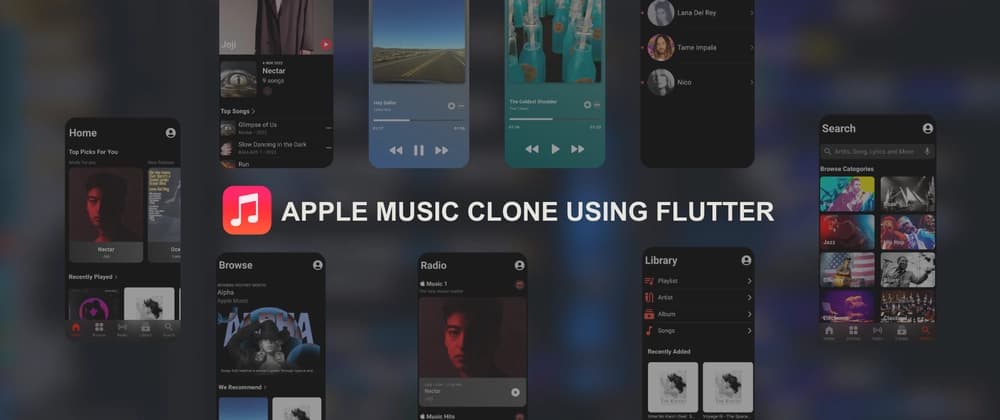
Yo devs 👋 I built an Apple Music Clone in Flutter, focused on local audio playback and a sleek, responsive UI — no APIs, no backend, just pure Flutter fun.
git clone https://github.com/nakuldevmv/Apple-Music-Clone cd Apple-Music-Clone flutter pub get flutter run
Open in VS Code, hit run, and you’re jamming 🎵
This project was a fun way to push my Flutter skills while building something tangible. If you’re into Flutter or just love music apps, give it a shot and remix it your way.
👉 GitHub Repo: Apple Music Clone

Yo, what’s up devs 👋 This is my first ever blog here, and honestly, hitting publish feels scarier than merging code without testing.
I didn’t start coding like some 10-year-old prodigy building apps in their garage. Nah, I started by smashing Hello World into the terminal and feeling like I just hacked NASA. Fast forward, and now most of my time goes into convincing code to behave while Google, late-night coffee, and sheer stubbornness carry me through.
This blog is just me being real about the dev journey. the wins, the fails, the midnight bugs that magically fix themselves after snacks. If you’ve ever whispered “please work” before hitting run, then hey… we’re already friends.